

Let me ask you something honest:
How many times this week did someone ask “How much is this?” and you had to stop what you were doing to reply?
How many times did you send the same product photos to different people?
How many sales did you lose because you replied 3 hours late and the customer already bought from someone else?
If you’re like most Nigerian business owners, the answer is: Too many to count.
Here’s what’s really happening:
You’re working HARD, but your business model is working AGAINST you. But this changes today!
After reading this 5 minute blog post, you should be able to easily create your breally website in minutes, and upload all your products so you can run business better this 2026 even while you sleep.

Why You Need an E-commerce Website (Even If You’re Already Selling)
Let me paint a picture for you.
It’s 11 PM. You’re sleeping. But somewhere in Lagos, Port Harcourt, or even London, someone wants to buy your product. They search for you online. They check your Instagram. But there’s no easy way to see all your products, check prices, or place an order.
So they buy from your competitor instead.
An e-commerce store solves this problem. Here’s what it does:
- It sells while you sleep: Your store works 24/7, even when you’re offline
- You look more professional: No more screenshot catalogs or “DM for price”
- It helps you build trust
- Saves you time: No more answering “How much?” 50 times a day
- And you can easily track everything: Know what is selling, who’s buying, and how much you’re making.
If you have read this far, congratulations, it shows you are ready to take your business to the next level in this new year, but before we proceed, let’s briefly talk about breally, why you should open an account now and how it can help your business grow massively..

Breally is a tool that helps you sell your products online.
That’s it. That’s all you need to know…
But let me explain it like you’re five years old and run a business:
You know how you have a WhatsApp account? Breally is like that, but for your business.
Instead of sending product photos one by one to your buyers, you put everything in one place. Customers visit that place, see everything, and buy without you having to lift a finger.
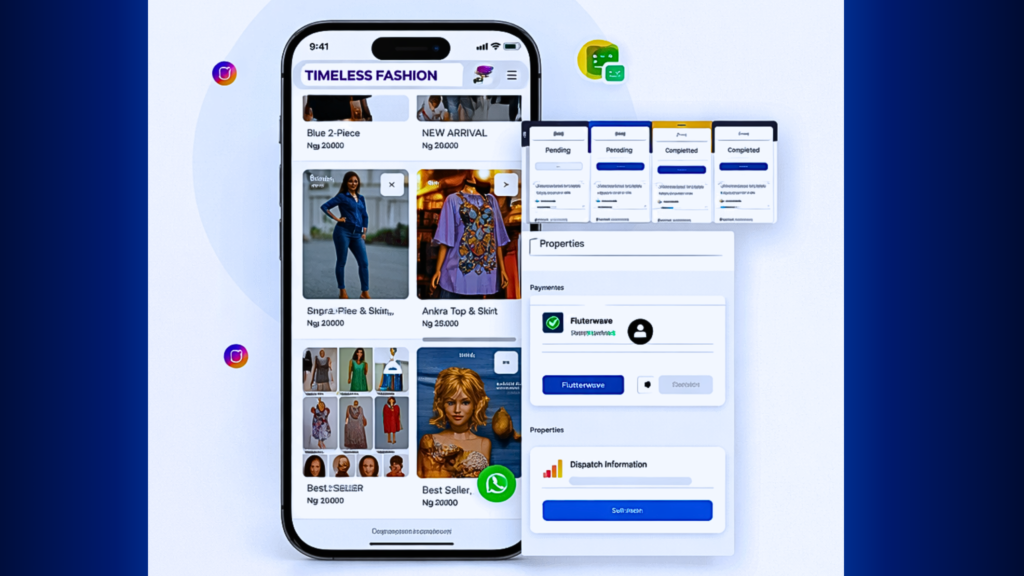
But, Why Breally and not something else?
Because Breally was made for Nigerian businesses. For people like you and me.
Other platforms like Shopify? They’re expensive. They’re complicated. They were made for oyibo people who have different ways of doing business.
Breally understands us:
- We use WhatsApp for everything
- Our customers pay with bank transfer or cash on delivery
- We need something simple that works on our phone
- We can’t afford to pay ₦100,000 every month like some other business owners.
Now that we understand what breally is and how it can help our businesses, let us now dive into creating our breally account, step by step. To create an account, you should have the following:
Must have:
- Your phone or laptop (the one you’re using now is fine)
- Internet connection
- Your business name (even if it’s just “Tolu’s Shop”)
- Email address (like Gmail) and
- Phone number
That’s all.
Step 1: Create Your Account (Takes 2 Minutes)
Okay, let’s start.
- Open your phone browser (Chrome, Safari, anything)
- Type this in the address bar: app.breally.co/signup
- You’ll see a page asking for a couple of informations.
Fill in your full name
Phone number
Email address
Shop address and answer a few questions regarding your business
- Click the big button that says “Create Account” and in seconds your account will be created 🎉
Breally will send an email to you indicating that your account has been created successfully. Now when this has been completed, we will move to uploading our CAC document and finally creating our storefront..
Step 2: Upload Your CAC document (Takes 3 Minutes)
When you log in, you’d see your dashboard. It’s like the home screen of your business.
Don’t worry if it looks empty. We’re about to fill it up.
Navigate to the button that says “Upload CAC document” it will be right there on your screen
Now fill in these details:
Sign the agreement form by ticking the button
Add your Business registration number
Fill in your name as stated on the CAC document and finally
Upload your CAC document
This will take up to 5 minutes to verify but once it does, you can now proceed to create your storefront
Step 2: Create Your Business Storefront
This storefront is what customers will see whenever they login to your website.
Now the first step here is to navigate to the drop down menu at the left hand side of the screen, click on storefronts and click on the create storefront button
Another interface will open up, now you will be asked to fill in business information:
Business name, for example: “Mama Ngozi’s Kitchen” or “Fresh Kicks Naija”
Your meta description
Your business tagline and hit “create store”
And in a few seconds, your store will be LIVE and you can start uploading your products and selling in minutes, it’s this simple 💯
Step 4: Publish Your Store and Get Your Link (Final Step)
This is the final step.
Your store is ready. Now we need to make it live so people can visit. After your website is published, it will automatically go LIVE as well
Look for a button that says “Visit site” Click it and Breally will create a special link for your store.
It will look like this:
- yourshopname.breally.shop
Copy that link from the top of your browser and share to your social media handles or any customer that needs it…
This is your shop address. Anyone who clicks this link will see your store and can buy from you.
Where to Share Your Store Link
Now that your store is ready, let’s tell people about it.
Share your link everywhere:
- Send to all your contacts
- Post on your Status with a message like: “My online store is finally open! You can now see all my products and order 24/7. Check it out: [your link]”
- Add it to your About section
- Put the link in your bio (that clickable area at the top of your profile)
- Post on your Stories: “Visit my store!” with a swipe-up link
- Add it to your posts: “Shop now: [link]”
- Share on your business page
- Post in relevant groups
- Add to your profile
TikTok
- Add to your bio
- Mention it in your videos: “Link in bio to shop!”
The more you share, the more people see it and the more people see it, the more you sell.
It’s as simple as that…
Now that you know exactly how to create an account on breally and publish your website, in the next blog post, i will be showing you exactly how to add your products (inventory) to your breally website..
FAQS
1) Is this really free?
Yes. Breally has a free plan that includes everything you need to start:
- Your online store
- Up to 100 orders per month
- WhatsApp connection
- Basic features
You only pay if you want advanced features like automation or unlimited orders. But the free plan is enough to start.
2) Do I need to know computer stuff?
Not at all. If you can send a WhatsApp message, you can do this.
Everything is click and type. No coding. No technicality at all.
3) What if I get stuck?
Breally has a 24/7 support. You can email us or chat with them. [email protected] They’ll help you in minutes.
Plus, everything is designed to be simple. Most people don’t even need help.
4) Can I sell food? Clothes? Services?
Yes! You can sell anything legal. Physical products, digital products, even services like makeup artistry or photography packages.
5) How do customers find my store?
You share your link. Put it on Instagram, WhatsApp, Facebook, run ad redirecting to your website, everywhere.
Later, you can also show up on Google search (that’s a different topic for another day).
6) What if I don’t have products to sell yet?
Set up your store anyway. Add placeholder products or borrowed photos just to see how it works.
When you’re ready to sell, you update with your real products.
Practice now so you’re ready when the time comes.
Ready? Let’s Build Your Store
Follow the exact simple steps in this blog post.
20 minutes from now, you could have a fully functional website for your business..
Need help?
- Visit usebreally on youtube for video guides
- Email [email protected] if you get stuck
- The Breally team is here to help
Already have a Breally store? Share your store link in the comments below! Let’s support you..
Explore other Blog Posts
How to Set Up a FREE E-commerce Website in 2026 (Breally.co)
Building a Powerful Sales Funnel That Converts In 2026 And Beyond
Whatsapp Lead Generation : The Ultimate Guide (2025 Update)
10 Powerful Ways To Automate Your Whatsapp Business Messages In (2024)
15 Whatsapp Marketing Strategies For E-commerce Growth – (Breally.co)
How to Book Demos, Handle Appointments & Schedule Calls on WhatsApp
The Best Ways To Build & Grow A Fashion Business In Nigeria (2026 Update)
How Nigerian Businesses Are Making More Money with Breally in 2025
